A printhead is a consumable with a long life rather than a component that
lasts forever. When it goes, the printer is not finished — it needs the right head, and
usually a conversation about what wore the last one out.
We supply heads for the printers we sell and
for a good many we stopped selling years ago, because plenty of those are still working
and a good machine is not finished just because one part is worn. Whether yours is one of
those is the first thing worth working out, and it is further down this page.
Onsite where we attend, or
the machine comes to us from anywhere else — rates and areas are on that page.
Fitting a head is usually the smaller half of the job.
This is what a failing printhead looks like. Straight white lines,
the same width, in the same place on every label, running the direction the media
travels. Each one is a dead heating element in the head. It does not come and go and
it does not clean off — once an element is gone it is gone, and the
number of lines grows.
The lines are not the expensive part. The barcode is. On this tag the text is
still readable by a person, so nothing looks urgent. But a white line through a
barcode breaks the bars, and a scanner either misreads it or refuses it — which
is found at a loading dock or a customer’s goods-in, not by whoever printed it.
A label that a human can still read and a scanner cannot is the worst state for this
to be in.
Not our customer and not our printer — a real sample,
with the company, the barcodes and the identifiers taken off it.
Arrived here from the other end, with a scanner that will
not read?Why a barcode will not scan
starts with this fault and then works through the cable, the trigger and the battery
— because the scanner is usually the last thing wrong.
The same fault, on the part that has to scan. Every white line is a
dead element cutting the bars into pieces. A scanner reading across this either gets
the wrong answer or no answer — and it is under half the symbol here, because a
whole one would still read a real company off the page.
Before you order
Two things decide which printhead.
Get either wrong and the part will not fit, or it will fit and
print badly. Both are printed on the machine.
01
The printer, exactly
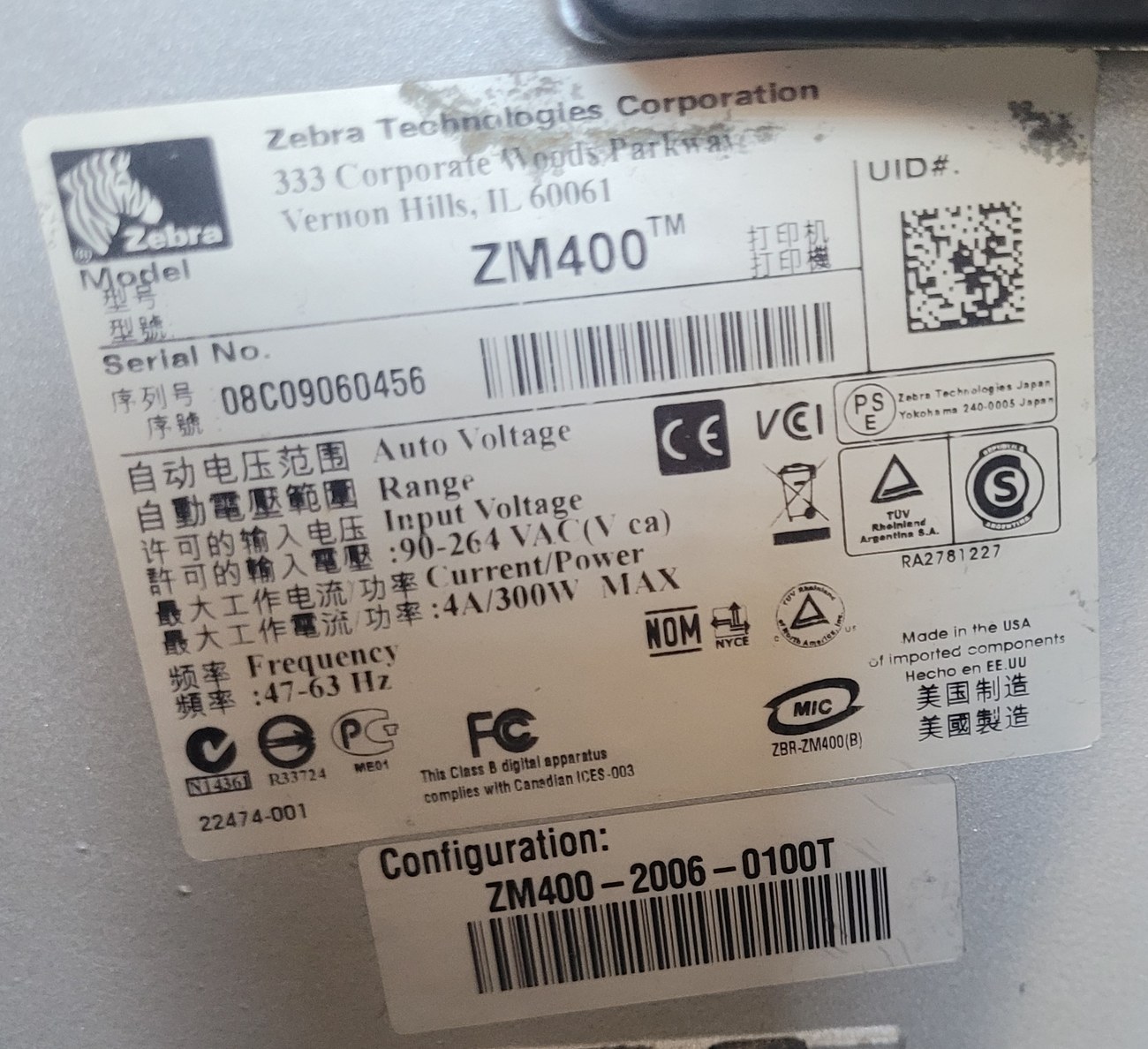
Not the range. A Z4M and a ZM400 are different machines and take different heads,
and both are on a plate on the back or underneath — a photograph of it settles this
in one message. Sometimes the answer is better than you expect: the ZT410 and the
ZT411 that replaced it take the same printhead part number, so an older ZT410
is no harder to supply than the current model.
02
The resolution
203, 300 and 600 dpi heads are not interchangeable, and the same printer model
was sold more than one way. A 300 dpi head in a printer set up for 203 prints
labels that look wrong and scan worse. Most warehouse labels are 203; 300 is for
small type and dense codes; 600 is for genuinely fine detail on a small label.
Ask why the last one died before ordering the next. A printhead that lasted six
months rather than several years usually did not fail — it was worn out early, by a
ribbon and a label stock that were never meant to meet, or by a machine printing at a
darkness setting that was compensating for the wrong pairing. Replacing the head
without changing that buys you another six months. We would rather ask about the
labels and ribbons first.
And sometimes the honest answer is not to fit one. A printhead is often around
a third of what the printer cost. On an industrial machine that is obvious
arithmetic — a new head in a ZT421 or a
fifteen-year-old ZM400 is a fraction of replacing it, which is exactly why those
machines are still working. On an entry-level desktop printer it is the opposite, and
nobody repairs those, ourselves included.
So we will ask what the printer is before quoting you a head,
and if the numbers say replace we will say replace — even though the head is the thing
you rang about and the thing we would rather sell you. A quote for a part that is not
worth fitting is a quote that costs us the next one.
What we supply
Current machines, and the ones that refuse to die.
Zebra printers last a long time in a way that catches people out
— a fifteen-year-old machine printing shelf labels every day is a perfectly good
machine with a worn part in it. The current machines wear out too — a
ZT111, ZT211 or ZT231 running all day is on its second
head soon enough, and that is the part doing its job rather than a fault.
This is our own ZM400. Serial 08C09060456 — the 08 makes it a
2008 machine, and the plate says “Made in the USA of imported
components”, which is what Zebra was still stamping on industrial printers
then. It printed the labels on our
pre-printed labels page in
August 2026.
Since 2008 it has had a printhead once or twice, a platen roller, and a
drive belt. That is the whole list. It is also, not by coincidence, exactly the
three parts we quote for when a printer comes in for repair — we quote them because
they are what actually wears out, and this is the machine that taught us.
Grouped by part rather than by printer,
because that is where the useful surprises are. The ZT410 and the ZT411 that replaced it
take the same head; so do the Z4M and the Z4M Plus, and one 203 dpi head covers
the ZT111, ZT211 and ZT231 between them. Every one carries a
three month warranty.
Fits
Part
Resolution
Part number
Availability
Z4M Plus, S4M
Platen Roller
any
G77023M
Ask
ZT410, ZT411
Platen Roller
any
P1058930-080
Ask
105SL
Printhead
203 dpi
G32432-1M
Ask
105SL
Printhead
300 dpi
G32433M
Ask
220xi4
Printhead
300 dpi
P1004239
Ask
GK420d
Printhead
203 dpi
PAZ105934037
In stock
GK420t
Printhead
203 dpi
PAZ105934038
Ask
S4M
Printhead
203 dpi
G41400M
In stock
S4M
Printhead
300 dpi
G41401M
Ask
Z4M, Z4M Plus
Printhead
203 dpi
G79056-1M
Low stock
Z4M, Z4M Plus
Printhead
300 dpi
79057M
Ask
ZM400
Printhead
203 dpi
79800M
Ask
ZM400
Printhead
300 dpi
79801M
Ask
ZT410, ZT411
Printhead
203 dpi
P1058930-009
Ask
ZT410, ZT411
Printhead
300 dpi
P1058930-010
Ask
ZT410, ZT411
Printhead
600 dpi
P1058930-011
Ask
ZT420
Printhead
203 dpi
P1058930-012
Ask
Genuine Zebra or an OEM equivalent — and the quote will say which. We supply
both. An OEM head is made by somebody other than Zebra to fit the same printer, and
depending on the part and the day, one, the other, or both may be available. That is
why this page carries part numbers and no prices: the quote is the point at which we
can confirm what it costs, whether it is on the shelf or coming in, and whether it is
Zebra-branded or OEM. Where there is a genuine choice you get both prices and you
decide. What you will not get is one quietly supplied as the other.
Not the printer you are looking at? The list
above is what we hold part numbers for, not the limit of what we supply — Zebra printers
we stopped selling years ago are still supplied. Ask.
Photographed 18 August 2026
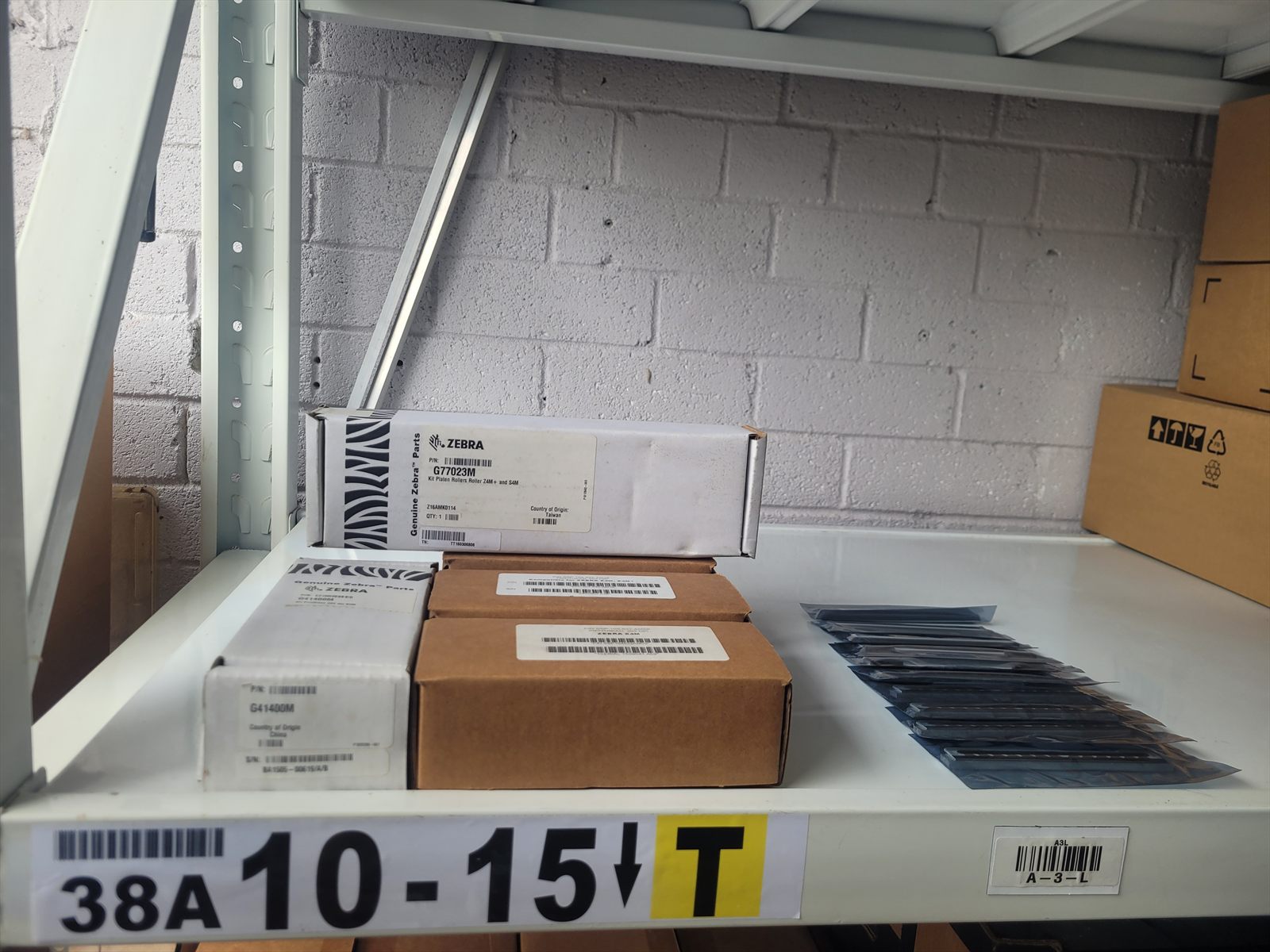
This is the shelf.
Not a stock photograph and not a render. Our own parts shelf in
Berowra, taken on the date above — because "we carry printheads" is the sort of claim
every barcode website makes, and a picture of the boxes is the cheapest way to show
that this one means it.
Bin 38A 10-15. Boxed kits on the left, bare heads in anti-static
bags on the right. The shelf is barcoded, which for a barcode company is either
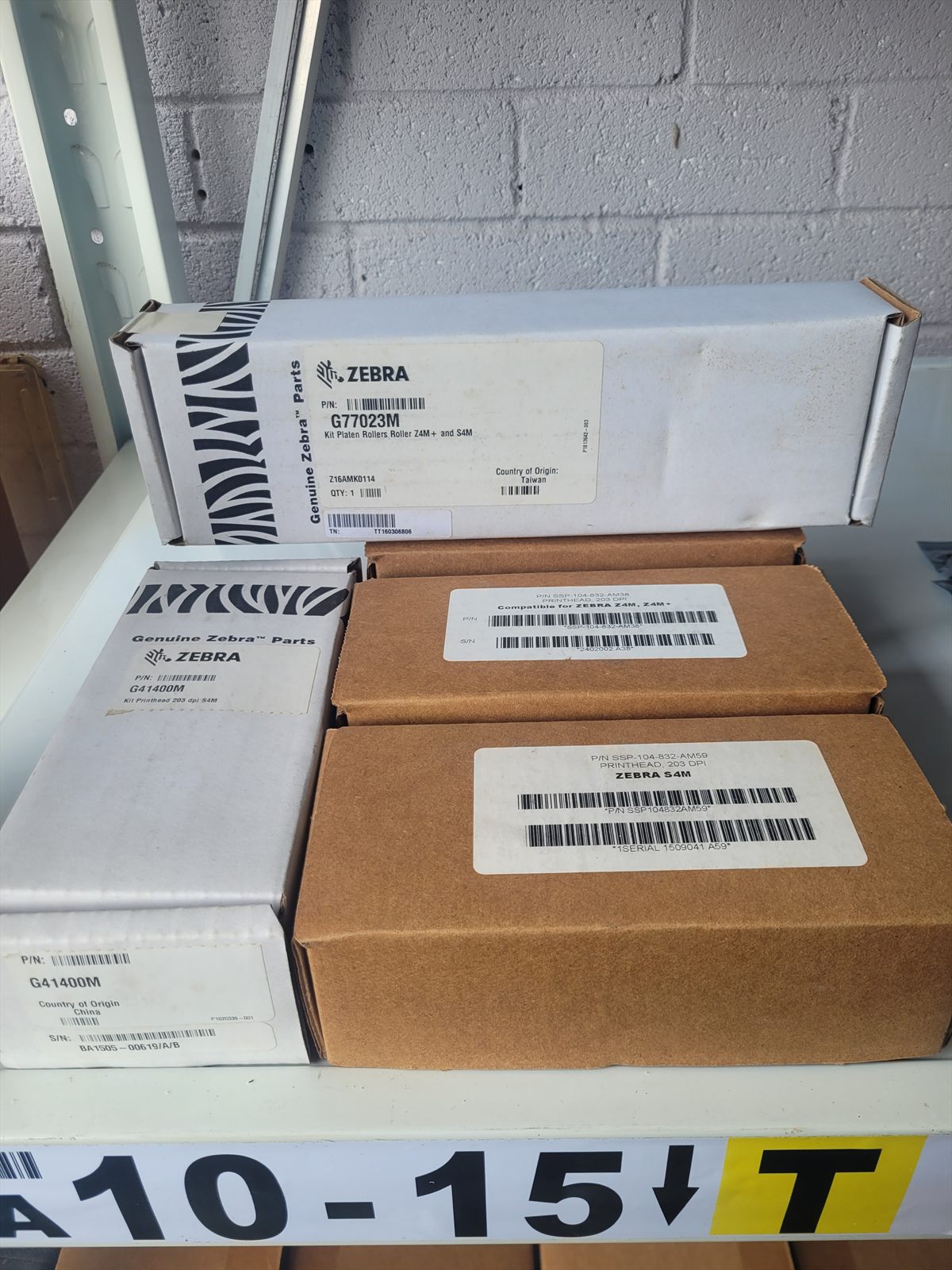
obvious or overdue.Both kinds, on the same shelf. The white cartons are Genuine Zebra —
G77023M, the platen roller kit for the Z4M+ and S4M, and G41400M, the
203 dpi S4M head. The brown boxes are OEM equivalents for the same printers.
Which one a quote offers depends on the part and the day, and the quote says
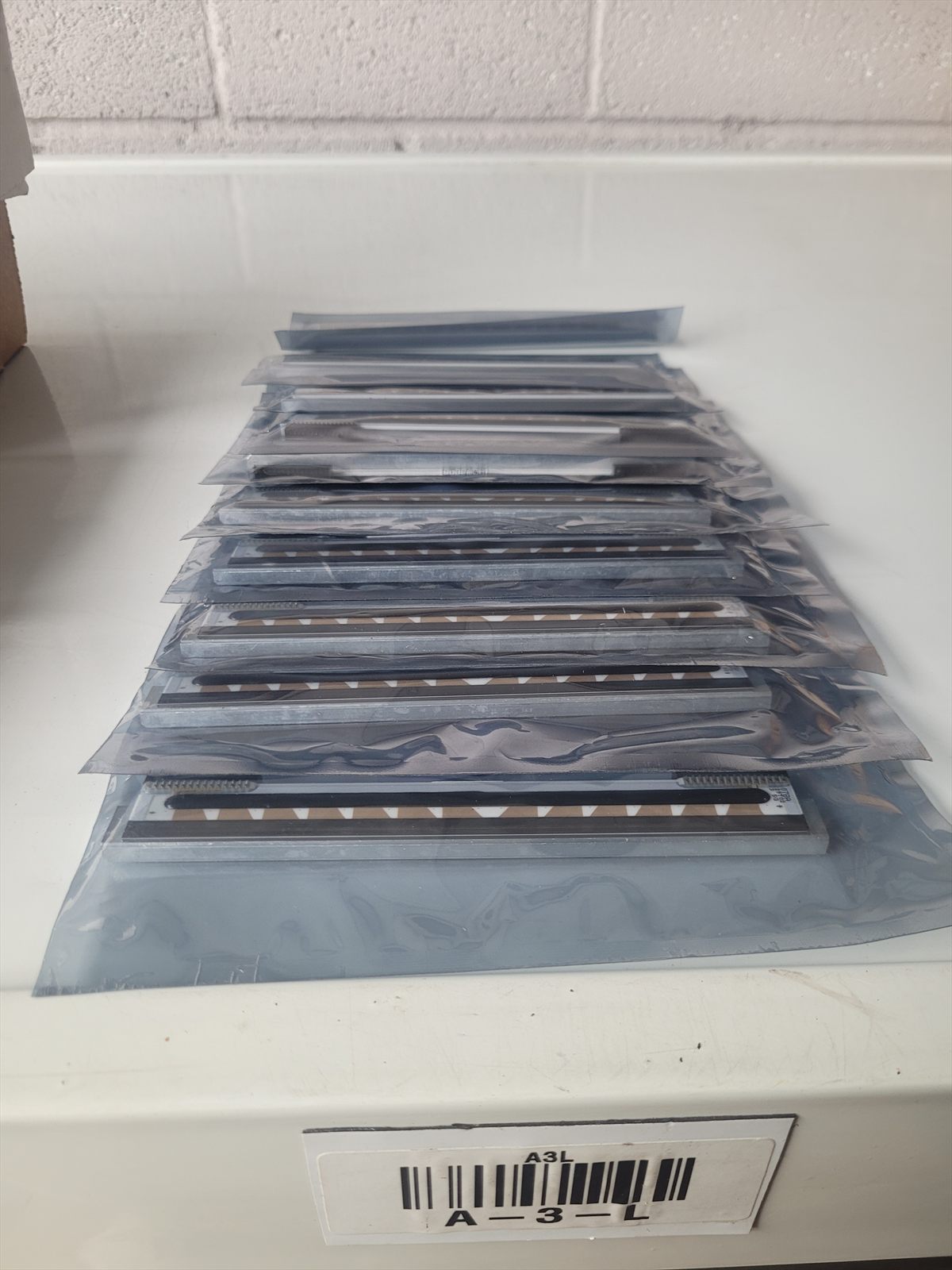
so.Bare heads in bin A-3-L, sealed as they are supplied. A printhead is
a strip of heating elements on a ceramic edge — the reason it is handled like
this.
Before you buy anything
Clean it first. Two minutes, and it costs nothing.
Most people who ring about a printhead have not cleaned it, and not
because they are careless — it looks like the one part of a printer you are not
supposed to touch. It is not. A customer who was too nervous to try is the reason this
is written down.
You need isopropyl alcohol and a lint-free swab. A Zebra cleaning pen is
the same thing in a tidier shape. Nothing else will do: water leaves minerals behind,
methylated spirits leaves a film, and anything abrasive — a fingernail, a
screwdriver, a paper towel — finishes the head on the spot. Isopropyl is the right
choice because it lifts adhesive and then evaporates, leaving nothing at all.
01
Turn it off and let it cool
A head that has been printing is hot enough to matter. Switch the printer off, open
it, and give it a minute. Alcohol on a hot head flashes off before it has dissolved
anything, so you would be wiping dry.
02
Find the print line
A narrow strip along the bottom edge of the head, usually a slightly different
colour to the metal around it. That strip is the row of heating elements and it is
the only part you are cleaning. Do not touch it with your fingers — skin oil
and static are both bad for it, which is why the spares on the shelf above live in
anti-static bags.
03
Wipe it end to end, one direction
Damp swab, light pressure, along the strip rather than across it. What comes away
grey or brown is label adhesive and melted ribbon. If the swab keeps coming up
dirty, keep going with a fresh one — it is the build-up that makes printing go
faint and patchy, and it does not come off in one pass.
04
Do the platen roller too
The rubber roller underneath, the one the labels run over. Same swab, turning it as
you go so you get the whole way round. A glazed or sticky roller feeds badly and
wears the head unevenly, so cleaning the head and not the roller only fixes half of
it.
05
Let it dry, then print one label
Wait until there is no trace of damp, close it, and print a single label rather
than a batch. You want to see what changed before you commit a roll to it.
How often is the part nobody does. Every
roll of labels on a direct thermal printer, and every ribbon change on a thermal transfer
one. It takes less time than loading the next roll. A head has a working life measured in
kilometres of label, and the thing that shortens it most is printing through grit and
dried adhesive — so the cleaning is not maintenance for its own sake. It is the
difference between replacing a head this year and replacing it in three.
When cleaning will not help. A sharp white line running down every label in the
direction of printing is a burnt-out element, and no amount of alcohol brings it back.
That one is a head. Faint all over, faint on one side, patchy, or slowly getting worse
over a few weeks is usually dirt, pressure, darkness set too low, or the wrong ribbon for
the label — and all four of those are cheaper than a part.
We sell printheads, and we would still rather you cleaned it
first. A head you did not need is the worst thing we could sell you. The second-worst
is the one you buy from somebody else next year, because the one we sold you did not fix
anything and nobody told you what would.
Doing it yourself
Replacing it yourself? Zebra filmed the job.
Zebra made a video for this exact machine —
How to Replace the
Printhead on a ZT231 Printer. It is better than anything we could film, so watch
that first. The ZT111 and ZT211 take the same head and the job is the same
on all three.
What the video does not tell you — five things worth knowing before you start.
01
Earth yourself before you touch it
A printhead is a strip of heating elements on a ceramic edge, and static kills them
silently — it will look perfect and print nothing. Touch the printer frame
first, hold the head by its metal carrier, and keep off the print line.
02
Photograph the old one before it comes out
The ribbon connector only goes on one way. The mounting does not always, and the
photograph takes two seconds against twenty minutes of working it out backwards.
03
Snug, not tight
Over-tightening bows the head, and a bowed head prints light down one side. If you
are leaning on the screwdriver you have already gone too far.
04
Clean the platen roller while it is open
You will not have the machine open again for a year, and a glazed roller wears the
new head unevenly from the first label. The swab and the alcohol are in the section
above.
05
If it prints nothing at all, suspect the install before the part
A sharp white line down every label means the head is finished. Nothing at
all is usually a ribbon cable that is not fully seated, or a latch that has not
clicked. People buy a second head because the first one “was faulty”.
A head bought from overseas usually cannot be
sent back, so the install is the part worth being slow about. If it does not come up,
ring us before you buy another one — that is a five-minute phone call and it
costs nothing.
Ask for a price
Send the plate, and what went wrong.
A photograph of the model and serial plate answers the first
question. What the print looks like now usually answers the second.
A white line down every label?
That is a burnt-out element and the head is done. Faint on one side, patchy, or
fading over a few weeks is usually something else — and worth a phone call before you
buy anything.