The ribbon wrinkles. Or one side is darker than the other.
Three different-looking faults, one control. Those two and labels that drift sideways while they print are all the printhead pressure toggles, and setting them costs nothing, needs no tools and can be put straight back.
Which is exactly why it is the first thing to try. Everything else that causes these means taking the machine apart.
Two toggles, and a scale moulded in beside each one.
Two on this ZM400. How many you have depends on the model — some industrial machines have one.
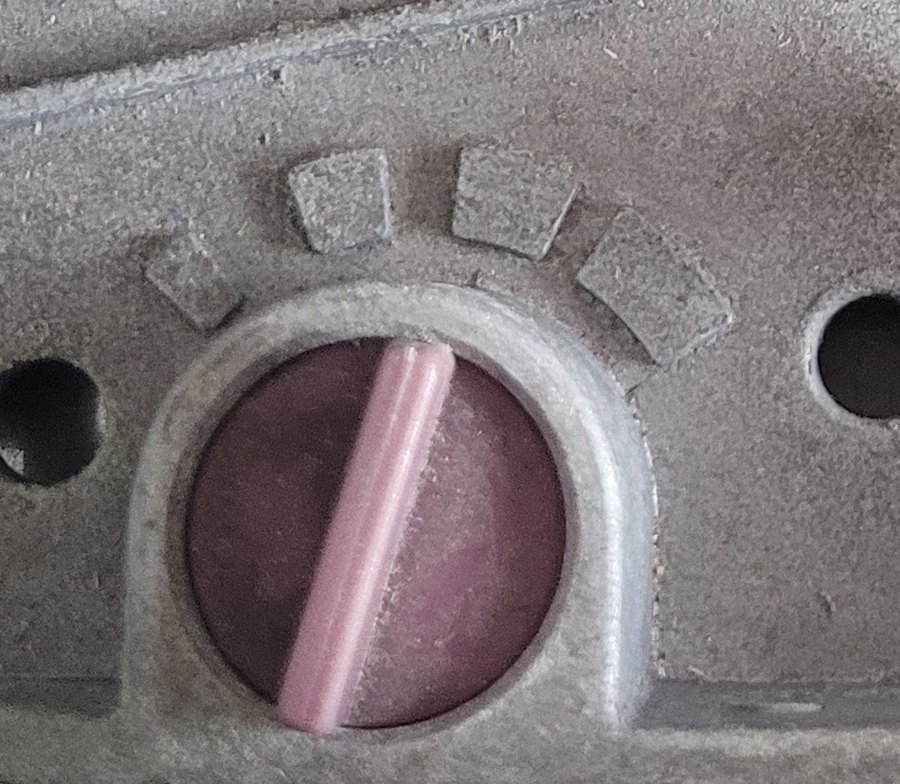
Zebra do not call them left and right. In their manuals these are the inside and the outside dial. Inside is the side your labels are justified against — the body of the printer, the edge everything is lined up on when the machine is loaded properly. Outside is the open side you reach in from. On this ZM400 that makes the left-hand toggle the inside one, because left is the side the labels are pushed hard against.
Worth having both sets of words for a practical reason. On a ZT411 or ZT421 the dials are marked 1 to 4, so a setting can be read off the machine and said down the phone — inside is on three means something to both people. The steps moulded beside these ZM400 toggles carry no numbers, which is why the method below counts notches up from the bottom instead.
Start at the bottom and come up one notch at a time.
It is trial and error, and the order stops it being guesswork.
Wind both toggles fully left
Least pressure, both sides, every time. Whatever somebody set last month, you are starting from a known place rather than from the middle of their guess.
Try the right-hand side, one notch
Clockwise. One notch, print a label, look at it. One at a time is the whole technique — two changes at once and you cannot tell which one did something.
Still not right? Now the left one
The left toggle takes the left side of the label. So if the left of your print is the weak side, that is the one to bring up.
You should not need to go far. Four on both sides, or wound fully right, is extreme and is usually unnecessary. If that is where you have ended up, the pressure was probably not the problem.
Nothing here is permanent. The scale is there so you can put it back exactly where it was.
Labels that drift sideways while they print.
Everybody blames the sensor or the guides. Zebra blame the printhead pressure, and they list it twice.
One side pressed harder than the other makes the label walk. The web creeps across as it feeds, a fraction of a millimetre a label, until the print is off the edge or the sensor has lost the gap. Nothing is broken and the roll is loaded properly. The head is pushing it over.
The fix is the one thing this page is about: even them up. Bring the lighter side up a notch, or take a notch off the heavier one. One change, print a label, look at it — same discipline as everything above.
Which way it walks tells you which side to move, and Zebra publish the rows for it — in the inside and outside wording above, so their page and this one are talking about the same two dials. Zebra's page on adjusting the printhead pressure →
They also publish starting points by label width, and the pattern is worth knowing even if you never look the figures up. Narrow stock wants the two sides uneven, because narrow stock only covers one end of the head. Wide stock wants them even. Their page carries the number for each width, and keeping a second copy of it here would only give it somewhere to go stale.
And they agree about starting low. Zebra's own instruction is to “Set the pressure to the lowest level necessary to achieve good print quality” — which is step 01 above, written as a specification.
If evening up the pressure does not stop it, then it is the usual suspects after all: a roll that was never pushed hard against the body, a guide left standing clear of it, or a sensor parked where the labels no longer pass. Labels that wander, and the sensor that cannot see them →
The other reasons, in the order worth trying them.
If the whole label is light rather than one side of it, that is speed against burn temperature and both are free to change. The scale runs 0 to 30 and most stock prints well between 15 and 25 — when it prints too light →
If the ribbon is loaded the wrong way round, nothing you do to the pressure will help, because the ink is facing the printhead rather than the label — how to load one, and the three ways it goes wrong →
A bowed printhead also prints light down one side, and it is the one that needs the machine apart rather than a thumb and two minutes. It is usually the result of over-tightening a head on the way in — printheads, and how to pick the right one →
A sharp white line down every label is none of these. That is a burnt-out element and the head is finished.
We have these on the bench.
If you would rather not poke at a printhead on a machine you depend on, that is a fair position and we will talk you through it — or look at it properly if it turns out to be more than a setting. Zebra service and repairs →
0414 53 53 95, or andrei@barcodedatalink.com.