Where, what, and how big
^FO52,28 is the field origin — 52 dots across, 28 dots down. ^B3 is Code 39 and the 100 is its height in dots. ^FD is the field data, so ^FDHELLO is what gets encoded, and ^FS ends the field.
If you need to drive a Zebra label printer from your own software — a PC application, a warehouse system, a handheld out on the floor — without going through a Windows printer driver, ZPL is the answer. You send the printer text. It prints a label.
No driver, no print spooler, nothing to install on the machine sending it. That is the whole appeal, and it is why a language designed decades ago is still the normal way to talk to a Zebra printer today.
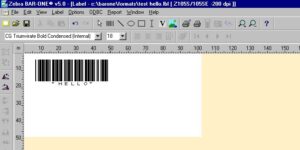
This one was designed in Zebra BarOne version 5, which is long gone, and BarOne would “print” the design to a text file instead of to a printer. The design is a Code 39 barcode reading HELLO. This is what came out.
^XA
^PRA
^LH0,0^FS
^LL384
^MD22
^MMR
^MNY
^LH0,0^FS
^BY3,3.0^FO52,28^B3N,N,100,Y,N^FR^FDHELLO^FS
^PQ1,0,0,N
^XZ
^FX End of job
^XA
^IDR:ID*.*
^XZ
^XA opens a label and ^XZ closes it. Everything between them is one label. The line in the middle is the only one that prints anything — the rest is setup.
^FO52,28 is the field origin — 52 dots across, 28 dots down. ^B3 is Code 39 and the 100 is its height in dots. ^FD is the field data, so ^FDHELLO is what gets encoded, and ^FS ends the field.
Save it in Notepad and send it. On a serial printer, from a command prompt: copy filename.txt com1. On a parallel one, copy filename.txt lpt1. Those are the original instructions and they still work on a printer old enough to have those ports. A network printer takes the identical file on port 9100 — same idea, over a cable that still exists.
This is the whole of it, and it is the thing that catches people out when a label prints in the wrong place.
The resolution most warehouse labels are printed at, and always have been.
For small type and dense 2D codes. Which resolution a job actually needs is a different question, and it is answered on the printers page rather than twice.
So moving something is arithmetic, not guesswork. Take that line again:
^BY3,3.0^FO52,28^B3N,N,100,Y,N^FR^FDHELLO^FS
To move the barcode 1 mm to the right on a 203 dpi printer, add 8 dots: ^FO52 becomes ^FO60. To move it 5 mm down, 8 × 5 = 40 dots, so 28 becomes 68. Both together:
^BY3,3.0^FO60,68^B3N,N,100,Y,N^FR^FDHELLO^FS
And this is the trap. Because those numbers are dots and not millimetres, the same file prints in a different physical place on a different printer. ^FO52,28 is 6.5 mm across on a 203 dpi head and 4.3 mm across on a 300 dpi one — the same instruction, two thirds of the distance. A label format that has been correct for years will land wrong the day it is sent to a finer printer, and nothing in the file changed.
Zebra has shipped three of them. Which one a printer understands depends on what it is and roughly when it was built, and a file written in the wrong one does nothing at all.
Everything Zebra sells now speaks it: the ZD220, ZD421 and ZD621 on a desk, the ZT411, ZT421 and ZT510 in a warehouse, the ZQ620 and ZQ630 on a belt.
Historically also the LP and TLP2844-Z, the TLP3844-Z, G-Series GK and GX, S4M, 105SL, ZM Series, Xi Series, and the QL and P4T mobile printers.
The LP2844, TLP2844, G-Series, QL Plus, P4T and RW Road Warrior.
This is usually the answer to a good question. If a label format has been printing since the 2000s and will not run on a new printer, it is generally because the file is EPL and the new printer is listening for ZPL.
Programming EPL2 programming manualZebra · 180 pages · PDF, 1.0 MB Download →
Written for mobile printers and best suited to the QL series, the P4T and the RW Road Warrior. For an RW, use CPCL.
Programming CPCL programming manualZebra · 376 pages · PDF, 2.8 MB Download →
If you get to choose, choose ZPL. It is on board every current printer, it is the one Zebra still documents, and it is easier to read once you know what ^FO and ^FD are doing. The only good reason to write anything else is a printer that will not take it.
Typing dot coordinates is fine for one barcode and miserable for a real label. Both the old way and the current way will write the ZPL for you.
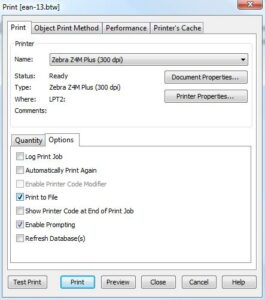
Design the label on screen, then File → Print, click Options, tick Print to File. Click Print and it asks for a filename instead of printing. What lands in that file is the ZPL for the label you just drew.
Zebra's own ZPL II, ZBI 2, Set-Get-Do, Mirror and WML programming guide. Every command and every parameter, and the reference behind everything on this page.
Programming ZPL II and ZBI 2 programming guideZebra · PDF, 16.8 MB Download →
Send us the ZPL and a photograph of what came out. Wrong position, wrong size, or the wrong language for the printer — it is nearly always one of those three, and it is quicker for us to read it than to explain how.
