The MC3400 is the MC3400 wherever it comes from. Same Zebra warranty, same
device, same carton. What differs is whether anybody helped you pick the right one, and
whether it works the day it arrives.
So this page is not a specification sheet.
Zebra publish one and it is better than ours would be. This is the part nobody writes
down: which keypad your system actually wants, and what happens to a device
between the carton and the shelf.
The decision you live with
Three keypads. Only one is right for your system.
This is the choice that matters most and gets the least thought.
The device is the same underneath all three — but an operator presses these keys
a few hundred times a shift for the next five years.
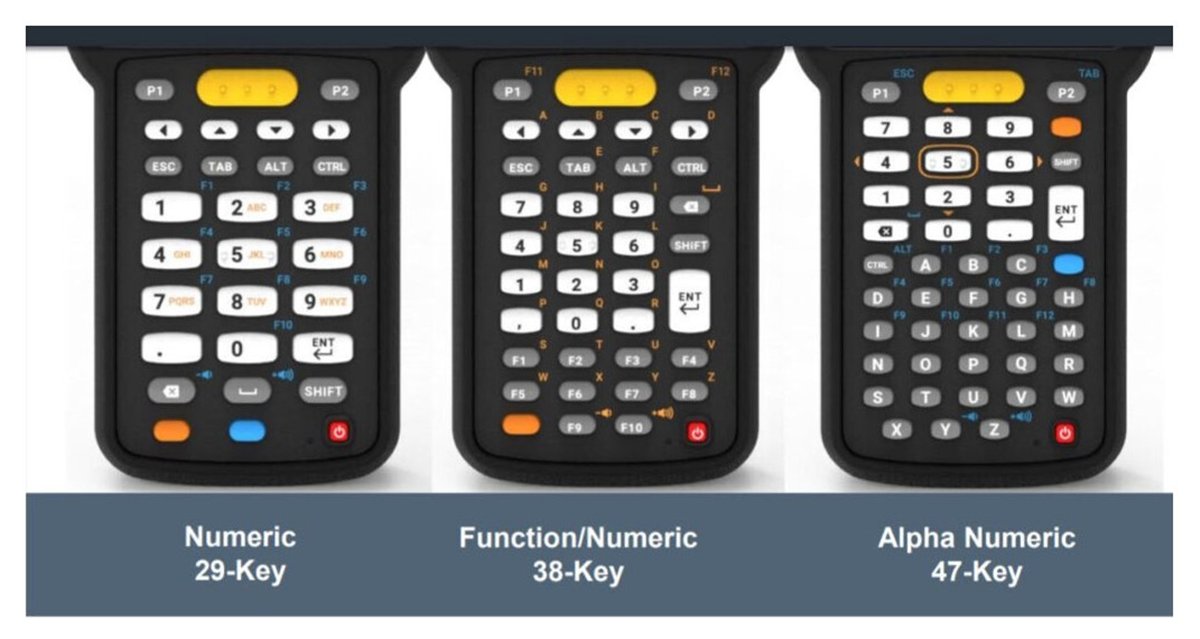
Left to right: 29-key numeric, 38-key function/numeric,
47-key alphanumeric. Look at the bottom of the 38-key — F1 to F10, on the
face of the keypad. That row is the whole argument.
29-key
When the only thing typed is a number
Numeric only. It is the right answer more often than people expect, because in a
properly labelled warehouse the bin is scanned and the part number is
scanned. The only thing a hand ever types is how many.
Fewer keys, bigger keys, less to get wrong with a glove on.
If your counts are the work, this is the one.
And for the first time in a while, it is one you can
actually have. There is a 29-key in the country now — the straight shooter,
standard range, further down this page. Want the same keypad on a gun grip and it is
still a twelve to fourteen week wait; we will tell you what that costs and you can
decide.
38-key
Numbers, plus function keys you can see
Running Pronto, this is the one we would supply. Pronto's function keys sit
along the bottom row here, one press away. On the 47-key you press
FUNC and then a number — two presses instead of one, on every
transaction, all day, by every operator.
No data sheet tells you that. Order the wrong one
across forty devices and you have bought a permanent tax on every scan.
47-key
When somebody has to type words
A full alphabet. Necessary if your process needs free text — a note on a
damaged carton, a name, a reference that is not on any label. The trade is smaller
keys and function keys moved behind a modifier.
Worth having when it is genuinely needed, and worth
avoiding when it is not.
The other decision
And how far away is the barcode?
The scan engine. It is the only other thing that changes the part
number, and it is decided by your racking rather than your budget.
SE4710
Standard range
In the hand, on the shelf in front of you, on the carton you are holding. This
covers most picking, receiving and dispatch, and it is the one most people need.
SE4770
Indoor and outdoor
Much the same reach, but it copes with an operator walking from a dim aisle into a
sunlit yard and back. If your work crosses that line all day, this is the one that
stops people complaining about the scanner.
SE55
In your hand and up to about 12 metres
The racking answer. It reads a label held in front of you and a label high in the
beams without anybody swapping devices or getting on a ladder. If your bin locations
go up rather than along, start here.
SE58
Up to about 30 metres
Long range proper. Very high bay, or across a yard. Fewer sites need it than think
they do, which is worth finding out before you pay for it.
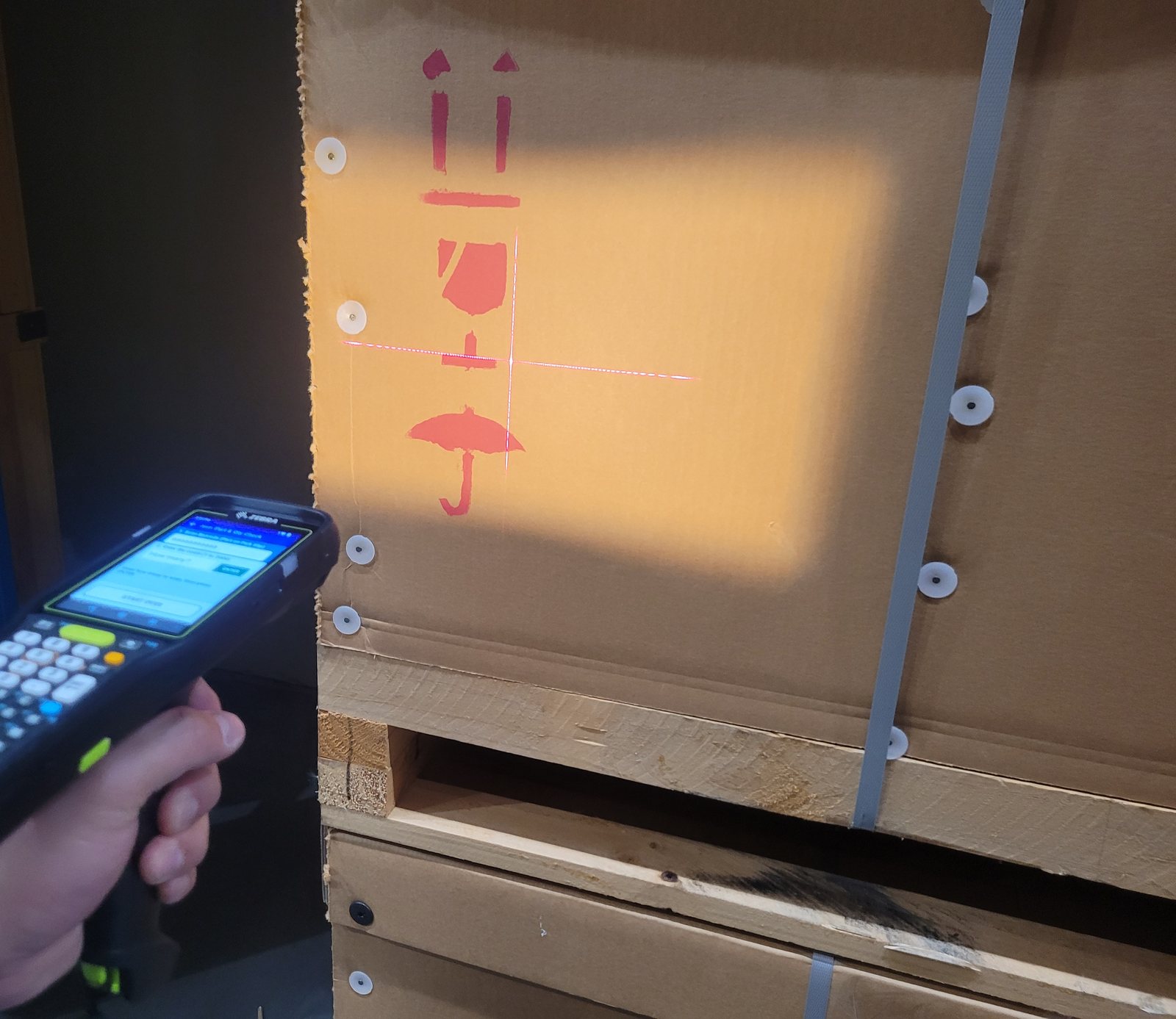
The aimer, thrown across a crate from about a metre. Whichever of the
four you pick, this is what it does: a 2D imager takes a photograph and decodes
it, rather than drawing a line and hoping the barcode is square to it. That is why
it reads a label that is scuffed, curled, upside down or behind shrink wrap — and
why the same scanner handles the barcode on your pick slip and the one on the product
without being told which is which.
Fifty-six versions of the MC3400 exist. Four of them are in the country.
The other fifty-two are a twelve to fourteen week
lead time, which is the real number on an uncommon configuration and the reason
Zebra's own advice is to stay with the popular ones.
Two models, two body shapes, three keypads, four scan engines,
three memory tiers and a camera option would be 288 machines if Zebra built every
combination. They do not. They build fifty-six — the list is further down
this page.
Stock does sometimes land sooner than that. A shipment already
ordered can arrive without our knowing it was coming, so if the one you want says three
months it is still worth asking — we will go and find out rather than guess. What
we will not do is quote you a date we have invented.
We do not quote the camera versions. Zebra now build these with front and rear
cameras, tied to augmented reality and AI — reading handwriting off a photograph,
recognising an address in a picture and blurring it out. Genuinely clever, and it will
matter. It does not matter yet in an Australian warehouse, and it adds cost to every
unit. Most people do not know the option exists, and on a phone they would know what it
was for — on one of these, ask yourself what for. If you want one we will get it.
We just will not put it on a quote you did not ask for.
If the camera is the question, ask. We keep an
MC9400 here with one —
a different machine, but you can hold it and see what the camera actually does before
deciding whether it is worth the cost on yours.
The honest way to settle this is not on a website. It is to put one in the hand
of the person who will hold it for eight hours. We bring an MC3400 out, and an
MC9400 with its keypads loose
— on that machine they come off in seconds, so a hand can go straight from a few
big keys to a lot of small ones.
The MC9400's layouts are not the MC3400's, and the terminal
emulation versions of them only change what is printed on the keys rather than how many
there are. The number of keys is the part you can feel, and it is the part that
decides this: how many sit under a thumb, and how big each one is through a glove.
That takes about ten minutes. Deciding
any other way takes about three months and the answer arrives after the invoice.
We will bring them out.
Zebra's own overview of the MC3400 and MC3450, played from
Zebra's server rather than copied onto ours. Nothing downloads until you press
play, and it is a 154 MB file — worth knowing if you are on a phone in a
yard. Pressing play is what tells Zebra you watched it; not pressing it tells them
nothing. It is the specification-sheet version of this device, which is exactly the
part this page does not try to do.
How it arrives
Two ways, and both are right.
We have customers on each, buying the same device in the same
month. We do not charge differently for the second one and we do not push anybody
towards it.
Option one
Drop shipped, cartons unopened
Some customers have their own IT team, their own device management, and a build they
apply themselves. They do not need us in the middle of it and it would only slow
them down.
So we ship the cartons and stay out of the way. That is a
perfectly good arrangement and one of our customers works exactly like that,
happily.
Option two
Staged here, delivered working
Everything below happens at our bench before anything leaves. Batteries in, charged,
configured, tested, repacked. The device arrives ready to work rather than ready to
be set up.
For anyone without an IT team to hand — or with one
that has better things to do than forty first-boot wizards — this is the
difference between a rollout and a fortnight.
Since everybody says it
What “staged” actually means.
It is not an impressive list. That is rather the point — it
is a job sheet, and the value is that somebody does all of it before the device reaches
a person who is trying to do their own work.
At our bench, before it ships
Out of the carton, onto the shelf
Unpack, count and check the right items arrived
Install batteries
Charge every device
Attach wrist straps
Through the initial setup screens
Install the Enterprise Home Screen — enable the apps that should be
there, disable the ones that should not
Test on our own wifi
Set time, region, date and screen timeouts, and turn USB debugging and developer options off before it ships
Install your applications
Configure DataWedge so a scan arrives in the field your system expects
On a freezer device, turn the touch panel heater on. Zebra ship it
disabled and their own manual says it has to be enabled to work — so a
cold-store unit sent straight
from the carton has half its heating switched off
Test all of the above, on every unit
Record the passwords and settings so they exist somewhere other than in
somebody's head
Label the things that go walkabout with a silver asset
label — the power supply for the single-slot cradle, the power supply for
the four-slot, and anything else that will end up in the wrong room
Repack into the original boxes, ready to deliver
On site, on the day
The three things we cannot do from here
Your wifi password. The customer types it in. We do not need to know it
and we would rather not — there is no version of this job that requires us to
hold your network credentials
The admin password. You choose it, and the factory defaults come off
before we leave
Testing where it has to work. Email, DataWedge, wifi coverage — in
your building, not ours
That last one is the whole reason to turn up. It
worked in our office. Our office is not a warehouse with racking in it, steel
everywhere and an access point somebody mounted in 2019. It has to work
there.
The wrist straps are not on an invoice. Neither is labelling the power
supplies. They are small things that stop a device being dropped and stop a charger
disappearing into another department, and arguing about them would cost more than they
do.
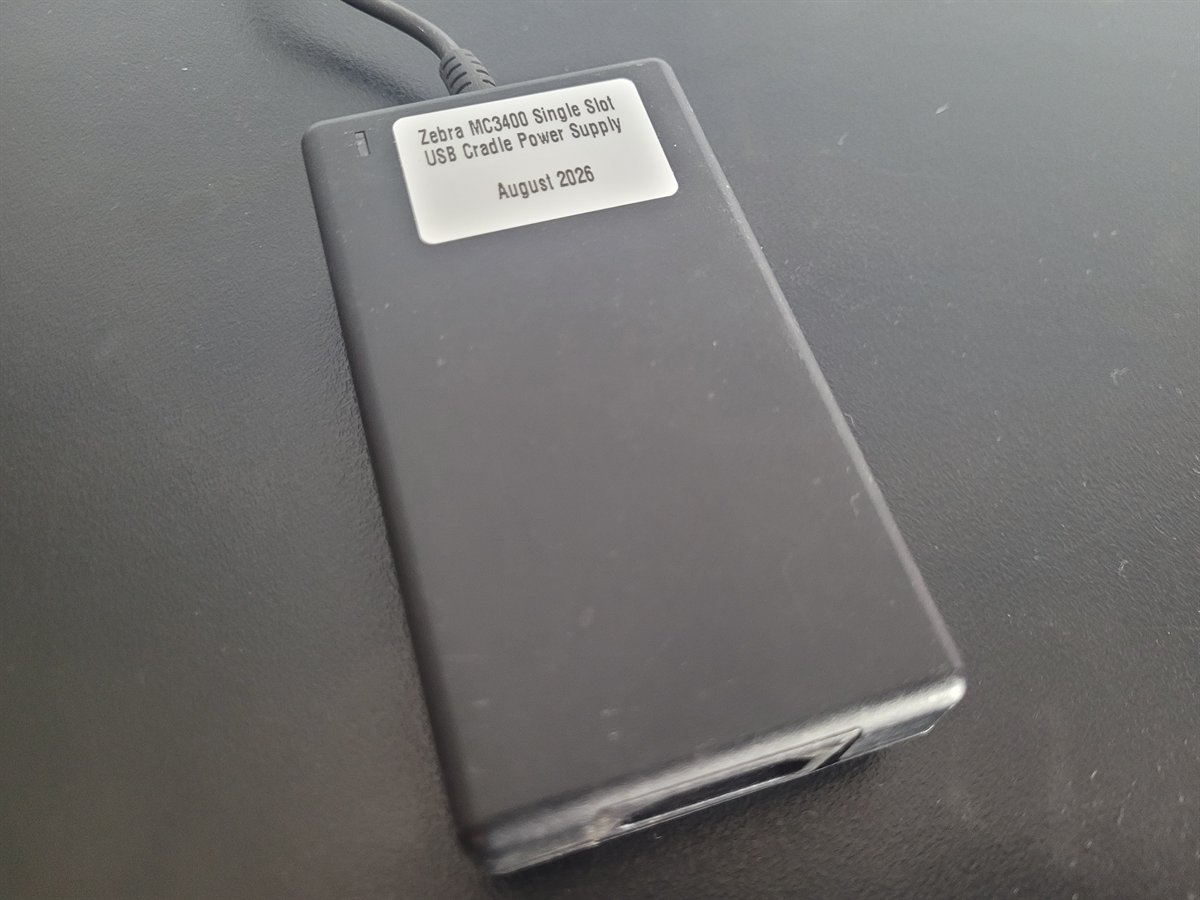
This is what that looks like. A power supply out of the carton
carries a part number and nothing at all about which cradle it belongs to — so
it gets a label before it leaves us, saying what it is for and the month it went out.
In a comms room in two years that label is the difference between a spare and a
mystery.
Before you order forty of anything
We will come and prove it.
01
The keypads, in your warehouse
An MC3400 in the hand, and an MC9400 with its keypads loose so a few big keys and a
lot of small ones can be felt one after the other. That argument settles in about ten
minutes this way.
02
A long range read, on your own racking
We bring a large magnetic label. Somebody goes up in the caged pallet or the
picker and puts it on a beam. Then we scan it from the floor. Whether a device reads
a label six metres up is not a specification anybody should take on trust — and
the magnet means nothing is stuck to your racking afterwards.
03
And the labels, while we are standing in it
What is on your racking now, whether it is the right material, whether a
bin location is readable from where a picker
actually stands. That part is free, and it is usually where the money is.
Sydney metro, the Central Coast and Wollongong — that is a drive and we
will do it. Further if the job warrants it; we have even flown to Melbourne and
Perth. For anywhere that far these days we would rather start on a video call than put
an airfare into your quote — you walk us round the racking on a phone, we show
you the three keypads and answer the questions.
The range
Part numbers, and what is in the box.
The prices below are the configurations we hold or can get
quickly. Anything else — another build, a quantity, or staging — is
quoted, because those move the number, and a figure on a page that is wrong for you
is worse than no figure.
Including one somebody else has quoted you. Every option is in the
code, and once you can read it you can see exactly what you are being offered.
MC3401 - 0 G 1 J54 SS - A6
│ │ │ │ │ │ │ │ │ └─ keypad │ │ │ └─── memory │ │ └───── scan engine, and the camera where it is called out │ └───────── body: G gun grip, S straight └────────────────── model: MC3401 wifi, MC345B adds cellular 5G (Zebra call it the MC3450)
Scan engine & camera
D
SE4710 standard range
J
SE4770 indoor and outdoor
K
SE55 near, and up to about 12 m
M
SE58 up to about 30 m
P
SE4770 indoor and outdoor, with front and rear cameras
R
SE58 up to about 30 m, with front and rear cameras
Memory
4
4 GB memory, 64 GB storage
5
6 GB memory, 64 GB storage
6
6 GB memory, 128 GB storage
Keypad
2
29-key numeric
3
38-key function/numeric
4
47-key alphanumeric
So MC3401-0G1J54SS-A6 reads:
wifi model, gun grip, SE4770 indoor and outdoor, 6 GB and 64 GB, 47-key alphanumeric. Which is one of the ones listed above.
Why this is worth two minutes of your time. Take any
quote you have been given, for these or for anything else in the range, and read it.
You will see whether you are being offered a camera you did not ask for, the standard
scan engine where the job needs the long one, or a different memory tier from the one
you were comparing against. That is not a trick anybody is playing — it is
usually just a code nobody expanded.
We worked this out; Zebra did not publish it. Or if they did, we could not find
it. The key above is read off fifty-six part numbers and it holds without
exception across all of them, and it agrees with the four scan engines Zebra do
document. We are telling you that rather than presenting it as gospel, because
-A6 on the end is the region code and the one thing we would not want you to
assume is that a part number from another market is the same device.
One of those is a straight shooter, and the rest are gun grips. The MC3400
is the only one of the two you can have that way — held and used like a phone,
which suits a packing bench or a counter better than a pistol grip does. The
MC9400 is not made in that
shape at all.
The mix above is the market. Local stock is overwhelmingly
gun grip, because that is what Australian warehouses run, so a straight shooter is
usually a special order and usually around twelve weeks. If that is the shape
your work actually needs, it is worth saying early rather than discovering it against
a rollout date. In the part number it is the character after the first dash: S
for straight, G for gun.
On the memory, since it varies. Some of these are 4 GB and some are
6. For a telnet session, and for most custom applications, 4 GB is plenty
— it is not the thing that will date the device. Worth knowing which one you are
getting rather than finding out, which is why it is in the list above.
The rest of the catalogue
Every configuration Zebra will build.
The ones above are what we hold and price. These are everything
else that can be ordered, grouped by keypad, because that is the decision.
29-key — 17 configurations
MC3401-0S1D42SS-A6SE4710 — Standard range · 4 GB / 64 GB · straight shooter
MC3401-0G1P64SS-A6SE4770 — Indoor and outdoor · 6 GB / 128 GB · camera
MC3401-0S1P64SS-A6SE4770 — Indoor and outdoor · 6 GB / 128 GB · straight shooter · camera
MC345B-3G1P64SS-A6SE4770 — Indoor and outdoor · 6 GB / 128 GB · cellular · camera
MC345B-3S1P64SS-A6SE4770 — Indoor and outdoor · 6 GB / 128 GB · straight shooter · cellular · camera
MC3401-0S1M54SS-A6SE58 — Up to about 30 m · 6 GB / 64 GB · straight shooter
MC345B-3G1M54SS-A6SE58 — Up to about 30 m · 6 GB / 64 GB · cellular
MC345B-3S1M54SS-A6SE58 — Up to about 30 m · 6 GB / 64 GB · straight shooter · cellular
MC3401-0G1R64SS-A6SE58 — Up to about 30 m · 6 GB / 128 GB · camera
MC3401-0S1R64SS-A6SE58 — Up to about 30 m · 6 GB / 128 GB · straight shooter · camera
MC345B-3G1R64SS-A6SE58 — Up to about 30 m · 6 GB / 128 GB · cellular · camera
MC345B-3S1R64SS-A6SE58 — Up to about 30 m · 6 GB / 128 GB · straight shooter · cellular · camera
That is 49 further
configurations on top of the 7 above, read
from our distributor's catalogue on 20 October 2026. Zebra add and drop
configurations without telling anybody, so ring before you rely on a part number
here — we read the live catalogue when we quote, which is the only version that
is current by definition.
None of these are held here, which is
the one thing that cannot go stale on this list. They are built to order: pre-paid, with
a real lead time we tell you before you commit rather than after —
how buying works has the rest of it.
Nobody asks until afterwards
Where does it live when nobody is holding it?
On the floor of a forklift, usually, which is how a five year
device becomes a three year one. None of these are Zebra parts — we import them
as they are needed, because the mount that suits your vehicle is not the one that
suits somebody else's.
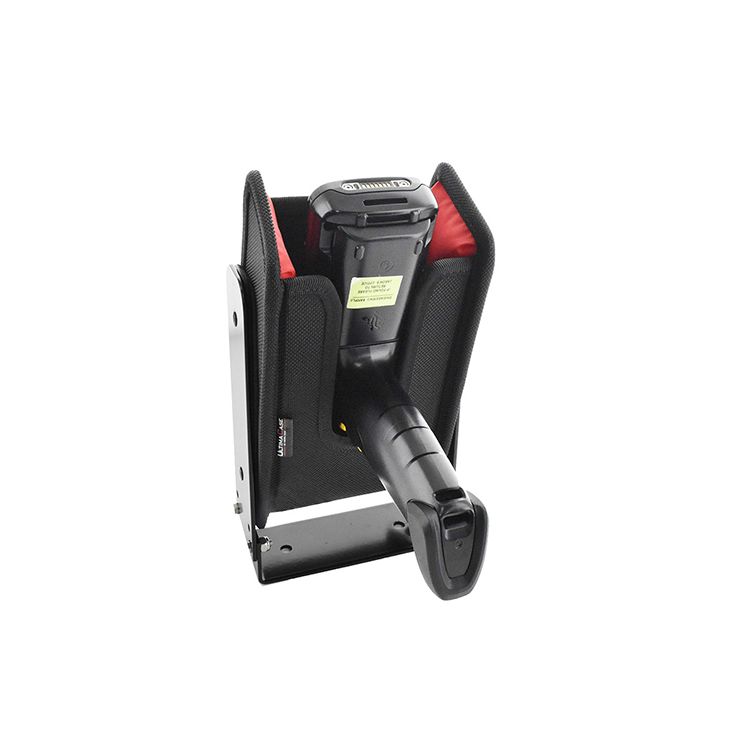
Steel bracket. Bolts to a mast, a post or the end of a bench, and
holds the device at an angle so the grip is where a hand expects it. This is the one
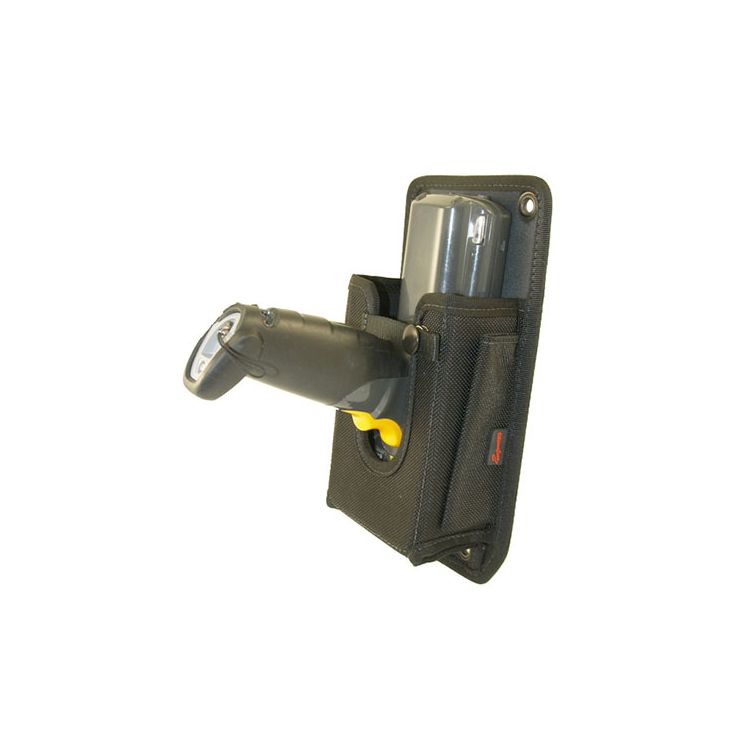
for a forklift — rigid, and it survives being knocked.Fabric, with a mounting flange. Four eyelets through a flat tab, so
it screws to a panel, a wall, the side of a workstation or the inside of a van.
Lighter, softer on the device, and it goes places a steel bracket will not.
These are the maker's photographs, and the device in them is not an MC3400. We
have not had a sample in our hands yet. When one arrives we will photograph it properly
with the actual device in it and put that here instead — the same as every other
photograph on this site that is ours.
Tell us where it has to live and we will find the mount. A forklift mast, a
pallet jack, a bench, a van. These two are what we know works; there are others, and
they come from overseas as they are needed rather than off a shelf here, so ask early
rather than after the devices land.
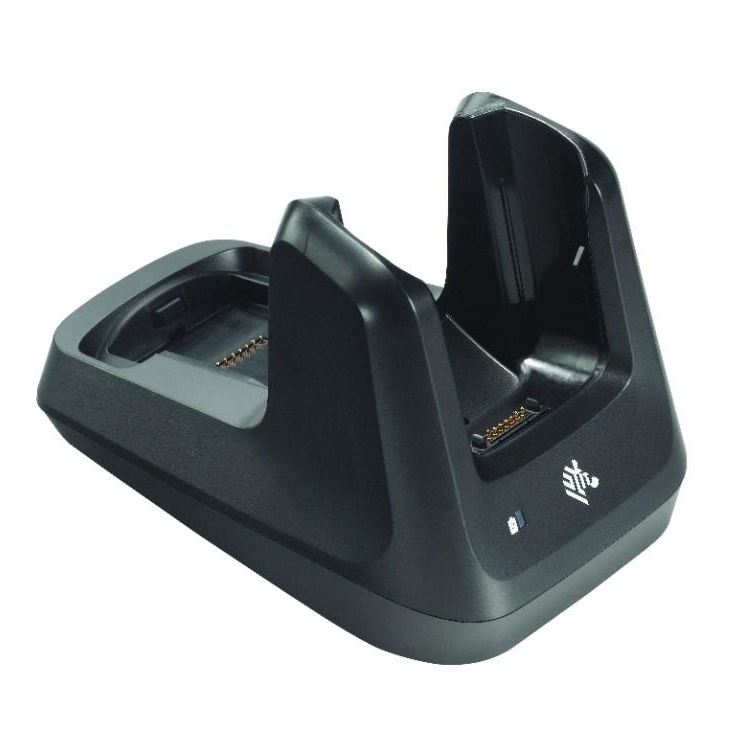
And your MC3300 cradles and batteries still fit.
Coming off MC3300s, the chargers and the batteries carry over — and the part
numbers below are the evidence rather than our word for it.
Before you buy anywhere
“We will not support it unless you buy it from us”
Zebra put both generations in the name. The four-bay dock is called
CRD-MC33-4SC4BC-01 — Multidock
Charge/Battery 4-Bay MC33/34. That is Zebra’s own product name, not our
reading of a compatibility table: one part, both device generations, said out loud.
Four device bays and four spare battery bays, so a shift can hand over without
waiting for anything to charge.
The rest of the family is the same story.CRD-MC33-2SUCHG-01 is the two-slot charge
and USB dock, a bay for the device and a second for a spare battery.
CRD-MC33-5SCHG-01 is the five-slot, charge
only, for a bench or a comms room at end of shift. And the battery itself is
BTRY-MC33-52MA-01. Every one of them was
bought for an MC3300 and every one of them works on an MC3400.
A dock price is the dock. The four-bay needs a
PWR-BGA12V108W0WW power supply, a
CBL-DC-381A1-01 DC lead and an IEC power
cord, and those are three separate line items. It is the commonest way a charging
budget comes up short — not the docks, the things that switch them on.
We have supplied these with MC3400s already, so this is not
read off a data sheet. If you are moving a fleet, tell us how many docks you have and
where they sit, and we will say what you keep before you budget to replace it.
CRD-MC33-2SUCHG-01. Bought for an MC3300, still the dock for an
MC3400. The second bay charges a spare battery while the first charges the device,
which is what makes a two shift day work without a second terminal.
On its own, a scan is a beep. What makes a
device worth buying is what comes off it — and with the right app, what comes
off this one is a file every day that says what was checked, what was intended, and
who did it. No server, nothing connected to your systems, nothing anybody has to
approve.
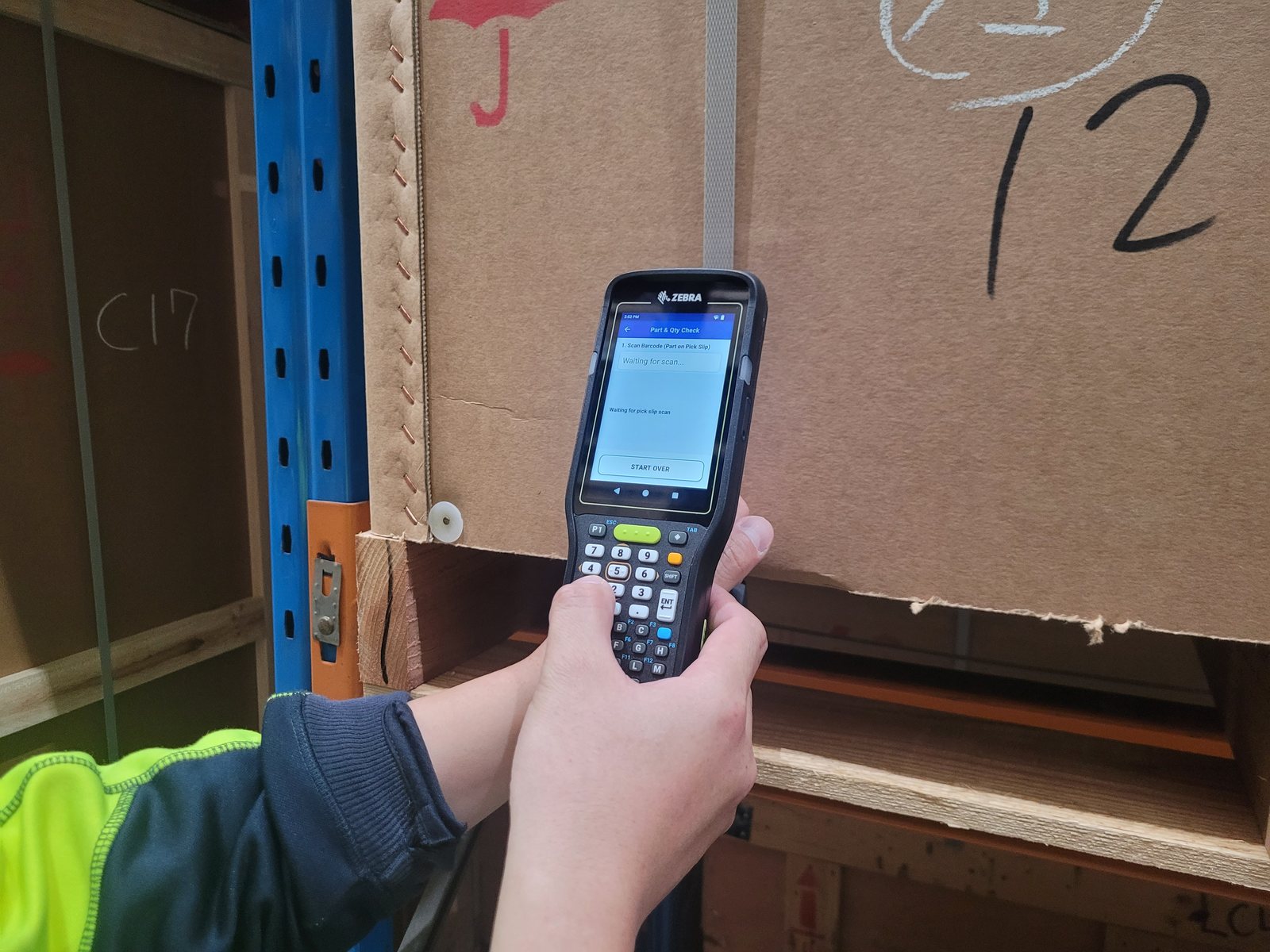
One of the four, on the floor. An MC3400 in a customer's warehouse
running Part & Qty Check — a build written
around their part numbers and their process, bought separately from the hardware. The
screen is the first step: scan the number off the pick slip and let the scanner hold
it, rather than holding it in your head.
Scan, file, report, decision
The file is written on the device as the work happens, and a month of them says
things nobody in the building currently knows — which parts get confused with
each other, which steps cause the errors, and how often the answer was already in
somebody's hand. Nobody reads a single day's data without a reason to. A month is
a different question.
Part & Qty Check is the
first one we built, and there are four of them running on this exact device in a
warehouse now.
Custom Android apps is the honest version of when
having one written is worth it — and the three cheaper answers that usually
win instead.
The app is not in the carton
The device is one price and the app is another, always. Every build is
written around one warehouse's part numbers and one warehouse's process, so there is
nothing on this page that arrives bundled with software you did not ask for.
Buy the hardware on its own and it is the hardware —
same Zebra warranty, same spares, same people answering the phone either way.
Tell us what it has to plug into.
Which system, how many, and what the operators actually type. That is enough for us to
tell you which keypad and what it will cost — and whether it is worth us driving
out.