Still running Windows Mobile?
Then you are in good company, and we are not going to tell you off about it. We ran a fleet of more than fifty Windows Mobile devices ourselves, on rental, right through to the end of 2024 — years after we knew better.
This page is what replaces what, what the move actually costs, and where the money goes that nobody warns you about.
Find the one you have.
Zebra kept the shape and the job the same across every generation, so the device that replaces yours will feel familiar to the operator who has been using the old one for a decade. The gun grip is still a gun grip. The keypad is still a keypad.


If you have been told the answer is an MC55 or an MC67, that was true once. The upgrade path inside this family ran MC50 → MC55 → MC67, and then MC67NA and MC67ND. Every one of them is long out of production, so all four now land in the same place. If a search told you otherwise, it found a page written a decade ago.
Almost all of the devices above are Windows — Windows Mobile or Windows CE — so everything in the next section about rebuilding the application applies to them.
The MC9200 is the exception, and it is worth settling before you budget for anything. The same MC92N0 was sold with CE 7, with Windows Mobile 6.5, and with Android — part numbers MC92N0-GA0SYEAA6WR and MC92N0-GM0SYEAA6WR are Android machines, 1D and 2D, on the 53-key keypad.
If yours is one of those, the expensive half of this page does not apply to you. There is no application to rebuild from nothing — you are in the easier case further down, with the TC51s, and your problem is aging hardware rather than a dead operating system.
The model number on its own will not tell you, which is the whole reason this is worth saying. Read us the full part number off the label and we will tell you which one you have.
And if you are keeping it going rather than replacing it, here are the manuals. Both came off our own server, both are the originals, and neither is on Zebra's site in a form you can find any more.
Legacy Motorola MC55 user guideMC55 · PDF, 13.6 MB Download →
Legacy Motorola MC3100 quick start guideMC3100 · PDF, 2.8 MB Download →
Then we will keep yours going.
A machine that still does the job is not an emergency. Batteries, keypads, cradles and brackets for equipment that went out of production a decade ago — we still get them, because plenty of our customers are still running it.


Brackets are the part nobody stocks. Batteries are easy and everybody has them. A mount for a fifteen-year-old terminal on a particular forklift is not, and it is usually the thing standing between a working device and a device in somebody's pocket. We import them as they are needed — tell us where it has to live and we will find it. That goes for current machines as much as old ones.
Already on Android?
Not everybody reading this is facing the hard version, and it would be convenient for us not to mention that.
Your application probably survives. Because these are already Android, there is no rebuild from nothing. An app written for Android 5 may need work to run on Android 13 — that is a service call, not starting again. This is aging hardware and a security-update cycle running out, which is a much cheaper problem than the one above.
Not on any list here? The MC75, and the older MC3000 and MC9000, have successors too. Read us the model off the back and we will tell you what it maps to — including whether it is worth moving at all this year.
And if the answer is that you are keeping them. Every cradle, battery, cable and holster Motorola made for the MC70 and MC75 is listed with its part number, including which ones fit both and the battery door that has to match the battery.
The hardware is the easy part.
Your application has to be rebuilt, not moved
This is the part that catches people, and it is worth knowing before you price anything. Windows Mobile software does not run on Android. There is no converter and no compatibility layer worth having. Whatever your terminals do today — picking, receiving, stocktaking, a green screen over telnet — has to be built again. Sometimes that is a week. Sometimes it is the reason the project stalled in 2018.
A green screen is the cheap case
If your terminals are running a telnet or TN5250 session into an AS/400, SAP or Pronto, you are in the best position of anyone reading this. That session is a terminal emulator, and there is a modern one for Android. The host system does not change at all.
It has a name, and on the two machines we sell most it is already installed when the device arrives. The MC9400 carries Ivanti All-Touch TE, pre-loaded and pre-licensed. The MC3400 carries Ivanti Velocity, pre-installed and pre-licensed on every model, with StayLinked SmartTE alongside it. Those are Zebra's own words off their two specification sheets, and pre-licensed is the part worth reading twice: on these two machines there is no terminal emulation licence to buy on top of the device.
What we do not do is configure it. Pointing the session at your host, laying out the screens and settling the security belong to your IT department or the people who wrote your system, because they are the only ones who know what it is talking to — the same division of labour set out on who supports what. We supply the device with the emulator already on it, and we will tell you which one you are getting.
Wifi is usually the surprise
Devices from that era speak an older wireless standard, and a site that has been running them happily has often kept old access points alive to suit. New devices want current wifi, and occasionally the upgrade you thought you were buying turns out to include the network. Better to find that out now than on go-live weekend.
Sometimes the answer is to wait
If the fleet works, the spares cupboard is full and nothing in the business is changing this year, that is a legitimate answer and we will give it. What is not legitimate is finding out in the middle of a stocktake that the last working battery has died and nobody makes them any more.
We were eight years late ourselves.
At a conference in 2016 Zebra said it plainly: Windows Mobile was finished, end of life was set for 2020, and Android was the future. They were right, and we did not move.
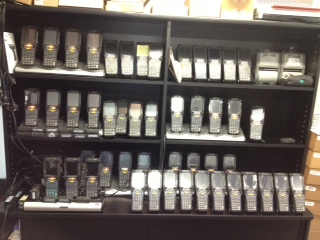
Rebuilding our own stocktake software for Android was expensive and would have taken months, so instead we kept more than fifty Windows Mobile rental devices alive and ran them to the end of 2024. It worked for longer than it had any right to. But the hardware got old, spares got expensive, repairs stopped being worth it, and customers who needed a modern answer went elsewhere because we did not have one.
Being late cost us customers, and there is no version of that story where it was somebody else's fault. Which is why, when we tell you what this migration actually involves, it is not a sales pitch — it is a receipt.
What is on the back of yours?
Read us the model number and roughly how many you have. We will tell you what replaces it, what has to be rewritten, and whether it is worth doing this year.